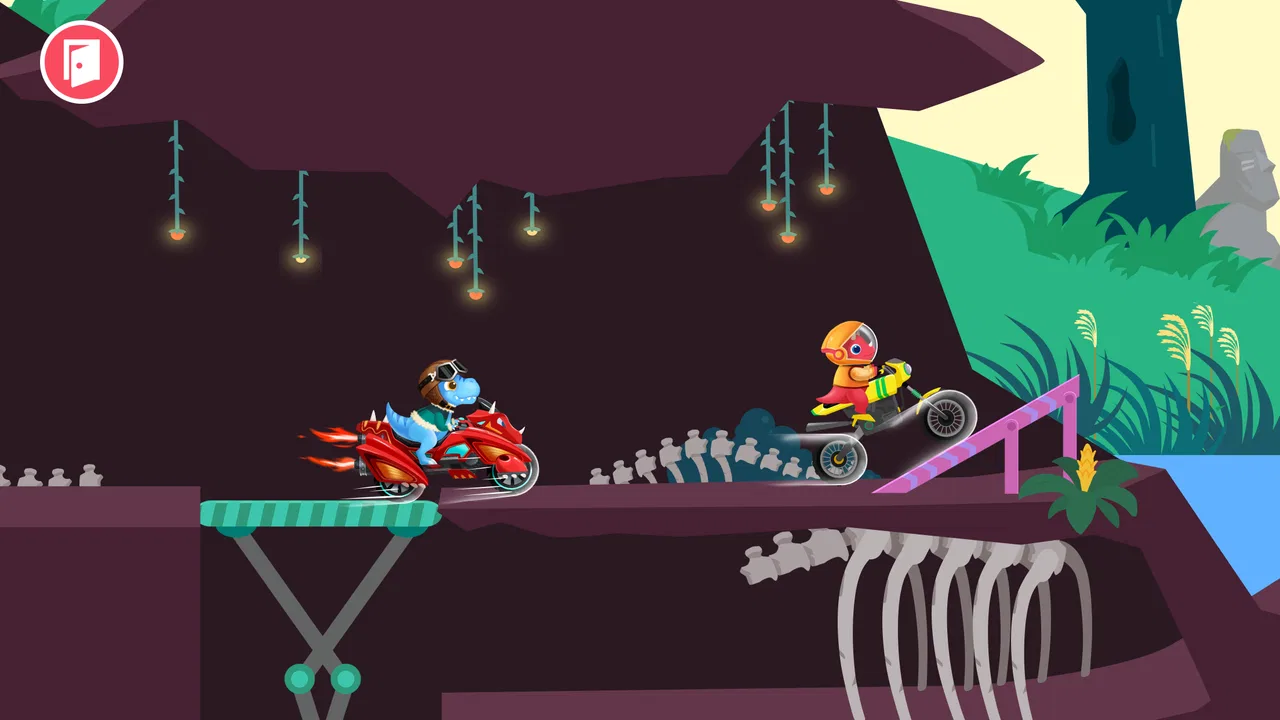
Dirt Bike Games for Kids
- 4.2
- Rating
- 1.00M
- Installs
- Free
- Price

 Analysis by App-foxy
I found Dirt Bike Games for Kids most useful as a short, low-pressure racing game for preschool children rather than as a serious motorcycle simulator. Its appeal is easy to understand: a young child can pick it up quickly, enjoy colorful dirt-bike action, and spend a few minutes experimenting without facing the speed, competition, or complicated controls found in many racing games. My overall view is positive, but it depends heavily on the child’s age and on what you want from a racing app.
Developed by Yateland Games for kids, this free racing game is aimed at children from two to five years old. It is rated Everyone, runs on Android eight and later, and has reached over one million installs. The current version is 1.1.9, while its average rating sits at 4.2 from around eight thousand ratings. Those figures suggest that it has found a substantial audience, but they do not change the main question parents should ask: will a very young child enjoy simple creative play more than a traditional race with clear winners and losers?
How the dirt-bike experience works for young children
When I look at this game through a preschooler’s eyes, its biggest strength is the way it treats racing as play. The dirt-bike theme gives children an immediate role to understand, but the experience is not built around advanced driving knowledge. A child does not need to know what makes a real motorcycle fast, how racing lines work, or why one vehicle handles differently from another. The basic idea is enough: ride, explore, try again, and discover what happens.
You May Also Like

 Blood Strike: 2.5 Anniversary
Blood Strike’s Loadouts Turn Every Drop Into a Tactical Gamble
A close look at Blood Strike’s custom loadouts: how fast access to signature weapons reshapes its battle royale rhythm, rewards preparation, and narrows the gap between fights.

 Pandora - Music & Podcasts
Pandora’s Music Is Easy to Start, but Harder to Recover
Pandora’s strength is its low-effort path from a seed to a station. Its weak spot is how much confidence it asks you to place in connection, setup, and quiet recovery.

 8 Ball Pool
 Is Built on Rivalries, Rematches, and Routine
A close look at the rivalries, rematches, shared routines, and unanswered safety questions that turn a quick pool match into a persistent mobile community.

 Samsung Music
’s Quiet Strength Is Playing What You Already Own
Its reach comes less from spectacle than from dependable access to a personal library. That simplicity is both the app’s strongest retention engine and its ceiling.

 AccuWeather: Weather Radar
AccuWeather Review: A Quick, Clear Forecast for Everyday Decisions
For everyday plans, the best forecast is the one you can understand quickly. AccuWeather makes rain timing, radar, and local conditions easy to act on, with a few trade-offs.

 Hill Climb Racing
Why Hill Climb Racing Still Turns Crashes Into One More Run
A tiny car, a bumpy hill and one more upgrade: Hill Climb Racing keeps resurfacing because its simple chaos makes every near-miss feel personal.
More From Our News Desk



That simplicity matters for the intended age group. Many racing games designed for older children assume that the player can follow several visual cues at once, manage acceleration and steering, and tolerate losing repeatedly. A two-year-old usually needs something more forgiving. Here, the attraction is the combination of movement and discovery. The child can focus on what is happening on screen instead of trying to master a demanding control scheme.
I also like the fact that the game presents itself as a safe dirt-bike experience. That does not mean parents should hand over a phone and walk away indefinitely, but it does make the concept more suitable for early childhood than a realistic motorcycle game filled with crashes, aggressive competition, or mature presentation. The tone is much closer to imaginative play than to a simulation of road riding.
The daily-challenge idea gives the game a useful rhythm. A child who has already played can return to see what the next activity offers, while a parent can use a short challenge as a natural stopping point. I would not treat this as a reason to encourage constant daily screen time. Instead, it works best as a small routine: play for a while, complete or explore an activity, and then put the device away.
One practical tip I found valuable is to let the child try the controls without immediately correcting every movement. Preschoolers often learn through repetition, and taking over the device can turn an enjoyable discovery into a lesson. I would first watch what the child does naturally, then offer one simple suggestion if they are stuck. Giving several instructions at once is likely to create more frustration than progress.
The creative-play angle is another important part of the experience. A child may not be trying to beat a personal best at all. They may simply enjoy making the bike move, observing the environment, or repeating a funny moment. That makes the game a better fit for children who are curious and exploratory than for children who demand a clear tournament structure.
Why the controls matter more than the racing label
With preschool games, the word “racing” can create the wrong expectation. Adults may imagine laps, rankings, and precision driving, while a young child may be happy with a bike that responds predictably. For this audience, control design is more important than realism. If the child can understand cause and effect quickly, the game feels rewarding even when the activity itself is simple.
I recommend starting with the device placed on a stable surface rather than expecting a small child to hold it while playing. This reduces accidental taps and makes it easier for the child to concentrate on the screen. It also gives a parent a better view of what the child is doing. For a toddler, that shared setup is more comfortable than treating the game like an independent console experience.
Another useful approach is to play together for the first session. A parent can identify whether the child understands the interaction, whether the pace feels comfortable, and whether the child is more interested in the bike or in the surrounding creative activities. That first observation tells you more than the store category. Some children who appear to like racing actually prefer exploration, while others quickly lose interest unless there is a recognizable challenge.
The game’s age range should also be read as a guide rather than a guarantee. A child near two may need more assistance with the device and with understanding the goal. A child near five may find the basic activities enjoyable but may soon want more variety, stronger competition, or more control. That difference is significant, and it is one reason I would not recommend the game equally to every preschooler.
What makes it a good everyday choice
The most convincing use case is a brief, supervised break at home. Imagine a parent preparing dinner while a child sits nearby with the game open for a few minutes. The child can engage with a familiar dirt-bike theme without needing to read instructions or understand a complicated progression system. The parent can check in, talk about what is happening, and stop the session before it becomes an endless request for more screen time.
It can also work during travel, waiting rooms, or a quiet afternoon when a child needs a calm activity. I would be more comfortable using it in those situations than a competitive racing game aimed at older players, because the intended presentation is gentler and the learning curve is less intimidating. Still, I would test it at home first rather than relying on any new game during an important journey.
A less obvious benefit is that the game can become a conversation starter. Instead of asking only whether the child won, a parent can ask what the bike did, what the child discovered, or which part they want to try again. That shifts attention away from performance and toward observation and storytelling. For a preschooler, that kind of shared conversation can make the play session more meaningful than silent tapping.
I also see value in using the game as a choice among several activities rather than as the default entertainment. Offering a limited play window and then moving to drawing, blocks, outdoor play, or reading keeps the app in proportion. The daily challenges can support a predictable routine, but I would avoid presenting them as an obligation. A child should not feel that missing a day means falling behind.
The important limitations parents should understand
The central weakness is that simple racing can become repetitive, especially for children who already play more advanced driving games. If your child wants realistic bikes, detailed tracks, hard opponents, or a strong sense of progression, this title may feel too light. Its preschool focus is its advantage for younger users, but it is also the reason older or more experienced players may outgrow it quickly.
The game is free to download, which makes trying it straightforward, but it includes optional in-app purchases ranging from $0.99 to $7.99 per item. That is a meaningful point for families. I would check the purchase settings before giving the device to a child and keep the first session supervised. Even when a game is designed for young children, a child may tap an attractive button without understanding that it can lead to a purchase.
I would also avoid judging the experience solely by its rating. An average of 4.2 is encouraging, and the game’s audience is large, but a rating cannot tell you whether the pace suits your particular child. One preschooler may enjoy repeating the same kind of activity, while another may need more novelty. The best test is a short session followed by a simple question: did the child want to explore, or were they asking to leave the game almost immediately?
Another limitation is the need for adult judgment around screen habits. A safe theme does not automatically make unlimited play a good idea. Young children can become absorbed in movement and bright visuals even when the game is not especially complex. I would set the stopping point before play begins, use a natural pause such as the end of a challenge, and give a warning before turning the device off.
Parents should also think about the difference between “creative play” and a genuine creative tool. This game can encourage experimentation within its own activities, but it should not replace open-ended toys, drawing materials, or physical play. If your goal is to help a child invent stories with no digital boundaries, a building game or offline activity may be a better choice. Dirt Bike Games for Kids is best treated as one small option, not as a complete play environment.
How it compares with other racing choices
Compared with racing games for older children, this one is less demanding and less competitive. That makes it easier to introduce, but it also means there is less appeal for someone who wants technical driving. A kart racer with opponents, drifting, and unlockable content may be more exciting for a school-age child, yet it can be overwhelming for a toddler. Choosing between them is not about which game is universally better; it is about whether the child needs accessibility or challenge.
Compared with realistic motorcycle games, this title is the clear choice for a parent who wants a softer introduction to the dirt-bike idea. Realistic alternatives often depend on balance, braking, speed control, and failure. Those mechanics can be satisfying for older players but are not necessarily useful for a child who is still learning how digital controls work. The trade-off is that this game offers less simulation and less depth.
Compared with non-racing preschool apps, it has a narrower theme but a stronger physical hook. Movement gives the child an immediate reason to interact, whereas a puzzle or educational app may demand more concentration and patience. If your child is fascinated by vehicles, that focus can be a major advantage. If they prefer animals, letters, music, or pretend play, another category may hold their attention longer.
One detail I would consider before downloading is the child’s tolerance for repetition. A game with a focused theme can be comforting because the child knows what to expect, but it may not satisfy a child who needs a new mechanic every few minutes. In that case, an app with several unrelated mini-games could provide broader variety. The downside would be a less coherent experience and possibly more menus for a young child to navigate.
Who should try it and who should skip it
I would recommend it to parents of toddlers and young preschoolers who want a gentle racing-themed activity that can be explored together. It is particularly suitable for children who like vehicles, enjoy repeating actions, and respond well to short challenges. The free entry point makes it reasonable to test, provided the adult checks the purchase controls and watches the first few sessions.
I would be more cautious if the child is close to the upper end of the intended age range and already expects sophisticated racing. That child may enjoy the dirt-bike theme but become bored with the simplicity. In that situation, a more advanced kart or motorcycle game could be a better long-term fit, as long as its controls, content, and competition are appropriate for the child.
I would skip it if you are specifically looking for an educational app with clearly defined lessons, a realistic riding simulator, or a multiplayer competition. This is not the right tool for those goals. I would also skip it if your family is trying to avoid games with optional purchases altogether, since the purchase range is part of the overall decision even though the download itself is free.
For families sharing one device, I suggest creating a simple routine: an adult opens the game, confirms the child is in the intended activity, and stays close enough to help. That workflow reduces accidental navigation and makes it easier to stop. It also lets the parent notice whether the child is enjoying the challenge, becoming frustrated, or simply tapping without understanding what is happening.
My final view after weighing the trade-offs
Dirt Bike Games for Kids succeeds because it does not ask preschool children to play like experienced racers. It uses the dirt-bike idea as an invitation to move, explore, and repeat, with daily challenges adding a reason to return. In my experience, that is more valuable for a very young player than adding complicated controls or a serious competitive structure.
Its limits are equally clear. The experience may not hold an older child’s attention, it does not replace broader creative or educational play, and the optional purchases mean parents should prepare the device before handing it over. The game is also best enjoyed in short, supervised sessions rather than treated as an always-available distraction.
For the right family, I think it is worth trying: especially when a two-to-five-year-old loves vehicles and needs a simple game that can be understood quickly. I would download it with modest expectations, play alongside the child at first, and judge it by the quality of the child’s engagement rather than by the racing label. If the child keeps experimenting, talking about what they see, and stopping comfortably when the session ends, this free game has earned a place in the rotation. If they want deeper competition or constant novelty, it is better to move on to a more advanced alternative.
FAQs for Dirt Bike Games for Kids
01What age group is Dirt Bike Games for Kids suitable for?
Dirt Bike Games for Kids is designed for children aged 4 to 10 years old. The game features simple controls and engaging graphics that cater to young players, ensuring a fun and educational experience. Parents can rest assured knowing the content is age-appropriate and encourages hand-eye coordination and problem-solving skills.
02Does Dirt Bike Games for Kids require an internet connection?
The game can be played offline, making it perfect for long trips or areas with limited connectivity. However, some features, like leaderboard access and additional content updates, may require an internet connection. Playing offline ensures uninterrupted fun without the need for constant internet access.
03Are there in-app purchases in Dirt Bike Games for Kids?
Yes, Dirt Bike Games for Kids offers in-app purchases that allow players to unlock new bikes, tracks, and customization options. While the game is free to download and play, these optional purchases can enhance the gaming experience. Parents can manage in-app purchase settings to prevent unauthorized spending.
04Is Dirt Bike Games for Kids available on both Android and iOS?
Yes, Dirt Bike Games for Kids is available for download on both Android and iOS platforms. Users can find it on the Google Play Store for Android devices and the Apple App Store for iOS devices. Compatibility ensures that most smartphones and tablets can run the game smoothly.
05How does Dirt Bike Games for Kids ensure the safety of children?
Dirt Bike Games for Kids is designed with child safety in mind, featuring no external ads and a parental control option to manage game settings. The user interface is intuitive, reducing the risk of accidental clicks, and the content is thoroughly vetted to ensure it remains family-friendly and educational.
Pros
- Engaging graphics and animations.
- Simple controls for young children.
- Variety of bikes to choose from.
- Interactive sound effects enhance play.
- Encourages hand-eye coordination.
Cons
- Limited levels may bore older kids.
- Ads can interrupt gameplay.
- In-app purchases can be costly.
- No multiplayer mode available.
- Lacks educational content.

Dirt Bike Games for Kids
Gallery